
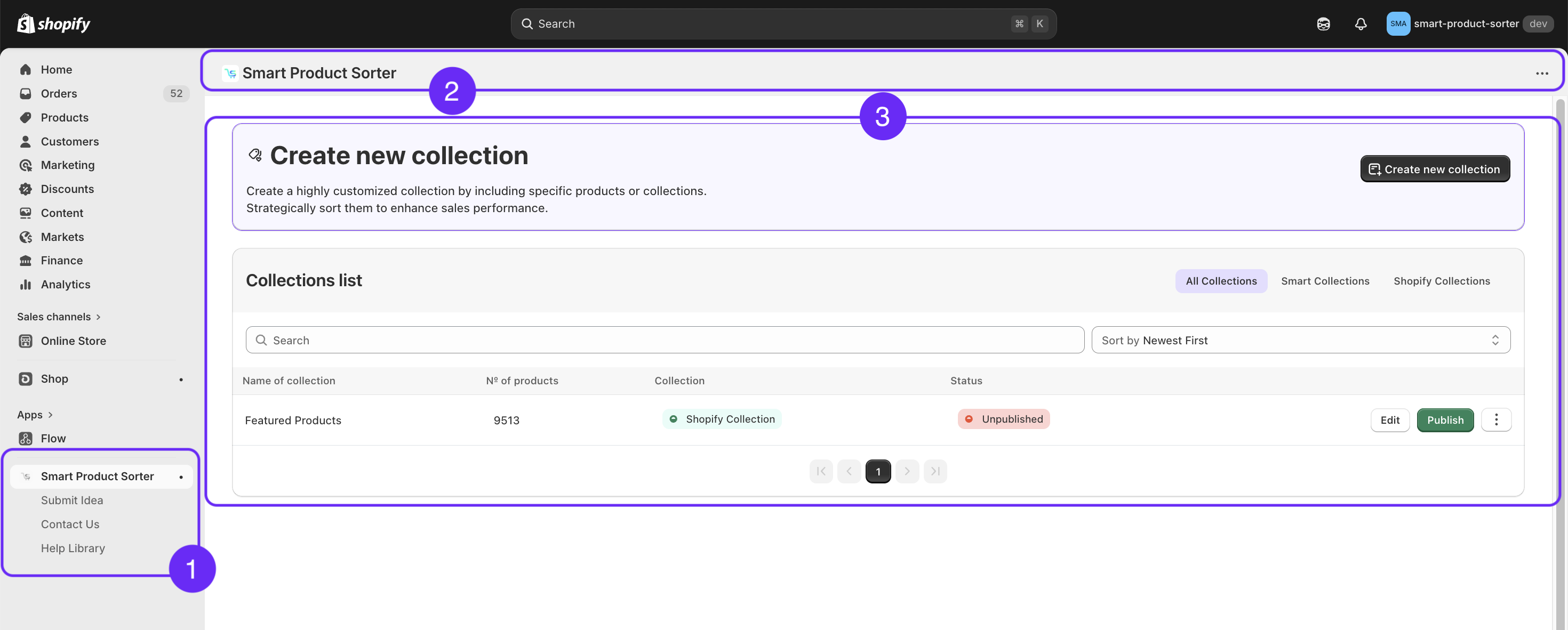
1. App Navigation
The left-side navigation menu gives you quick access to the app’s main areas:
Smart Product Sorter – view and manage your collections in one centralized space. Easily monitor activity, track updates, and stay organized.
Submit Idea – have a suggestion to improve the app? Share your ideas with us. Every submission is carefully reviewed, and you’ll be notified if your idea is implemented. Your feedback helps shape the future of our platform.
Contact Us – need assistance? Submit your inquiries directly to our support team. We’re here to provide prompt support and ensure you have the best possible experience.
Help Library – browse our Knowledge Base for helpful guides, step-by-step tutorials, and answers to frequently asked questions.
2. Header Navigation
The header is displayed at the top of the application and includes the following elements:
Logo – represents and identifies the SmartProductSorter app.
More Menu – provides access to additional actions:
Manage App – configure and manage the app settings within Shopify.
Get Support – contact the support team for assistance or technical help.
Pin/Unpin from Navigation – add or remove the app from your Shopify sidebar for quick access.
Uninstall – remove the SmartProductSorter app from your store.
3. Content Panel
The Content Panel allows you to view, manage, and organize your collections in one place.
Create New Collection
Create New Collection – Build a custom collection by including specific products or existing collections.
Collections List
Collections are displayed in a table view for easy management. Use filters or search to quickly find what you need.
Filters & Views:
Search – Quickly locate collections by name.
All Collections – Displays all collections in your account.
Smart Collections – Shows only collections created within SmartProductSorter.
Shopify Collections – Shows only collections created via Shopify > Products > Collections.
Table Columns:
Column | Description |
|---|---|
Name of Collection | Displays the collection name. |
No. of Products | Shows the number of products included. |
Collections | Indicates collection type: Shopify or SmartProductSorter. |
Status | Displays the current status: Draft, Published, or Unpublished. |
Edit | Allows you to modify collection details. |
Publish/Unpublish | Change the collection’s visibility status. |
More Menu | Access additional actions: Export, Duplicate, Delete. |